
Introducing Mandrill
You shouldn't need a code editor just to read a README. Mandrill renders Markdown files beautifully on macOS offline, instantly, and without asking for an account.

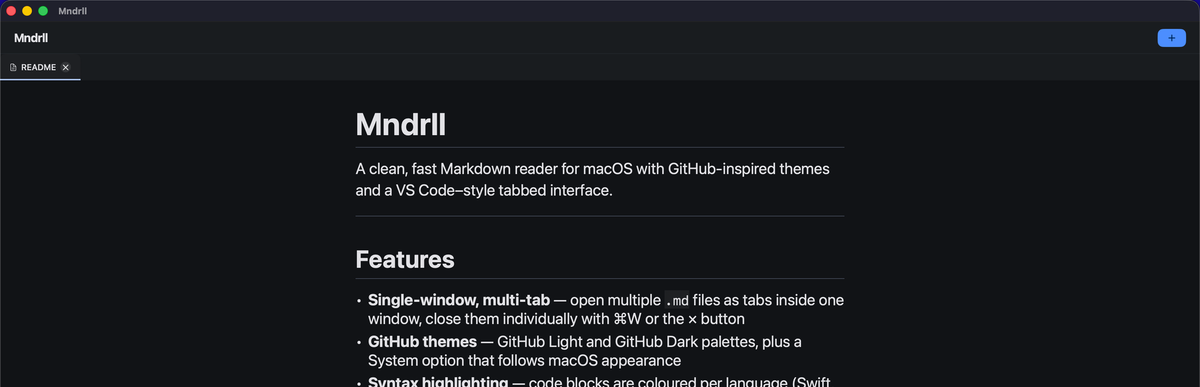
A Markdown reader that gets out of the way.
Every developer has been there. You clone a repo, open the README.md, and stare at a wall of raw Markdown syntax instead of the formatted document the author intended. So you open VS Code, install a preview extension, and wait. Or you push it to GitHub just to read it. Or you squint and mentally parse the asterisks yourself.
None of those are good answers. That frustration is exactly why I built Mandrill.
Mandrill does one thing: it opens a .md file and renders it beautifully. That's it.
Built for the way developers actually work
Mandrill is a native macOS application. Drag a file onto it, or open one from the file picker, and your Markdown is rendered instantly; headings, code blocks, tables, task lists, and all. No setup wizard. No account. No cloud sync. The file never leaves your machine.
What's Inside
- Renders GitHub-flavored Markdown including headings, tables, task lists, and blockquotes
- Syntax highlighting in fenced code blocks
- Drag-and-drop or standard file picker — open any
.mdfile in one step - Fully offline — no network requests, ever
- No account, no sign-up, no data collected of any kind
- Lightweight and fast — launches in under a second
Privacy by design
Mandrill has no analytics, no crash reporting, and no telemetry of any kind. We have no idea how many people use it, what files they open, or where they are in the world and I prefer it that way. Your files are yours. The app is a tool, not a data collection endpoint.
This also means Mandrill works in air-gapped environments, on planes, and anywhere else you need to read a document without a network connection.
A small app with a clear purpose
I deliberately kept Mandrill small. It isn't a Markdown editor (yet), a note-taking app, or a writing environment. Those tools exist and many of them are excellent. Mandrill fills a specific gap: reading Markdown files quickly, cleanly, and without friction. If you find yourself reaching for a heavy editor just to preview a document, Mandrill is the tool that was missing from your Mac.